Creating a React App
Installation & Setup
Step 1: Install Node.js
- Download and install Node.js from nodejs.org
- Verify installation:
node --versionandnpm --version
Step 2: Create React App
npx create-react-app my-first-app
cd my-first-app
npm start
File Structure Explained
my-first-app/
├── public/
│   ├── index.html          # Main HTML file
│   └── favicon.ico         # Website icon
├── src/
│   ├── App.js             # Main component
│   ├── App.css            # App styles
│   ├── index.js           # Entry point
│   └── index.css          # Global styles
├── package.json           # Dependencies
└── README.md             # Project info
Key Files:
- index.html: The single HTML page where React mounts
- index.js: Entry point that renders App component
- App.js: Main component where you write your code
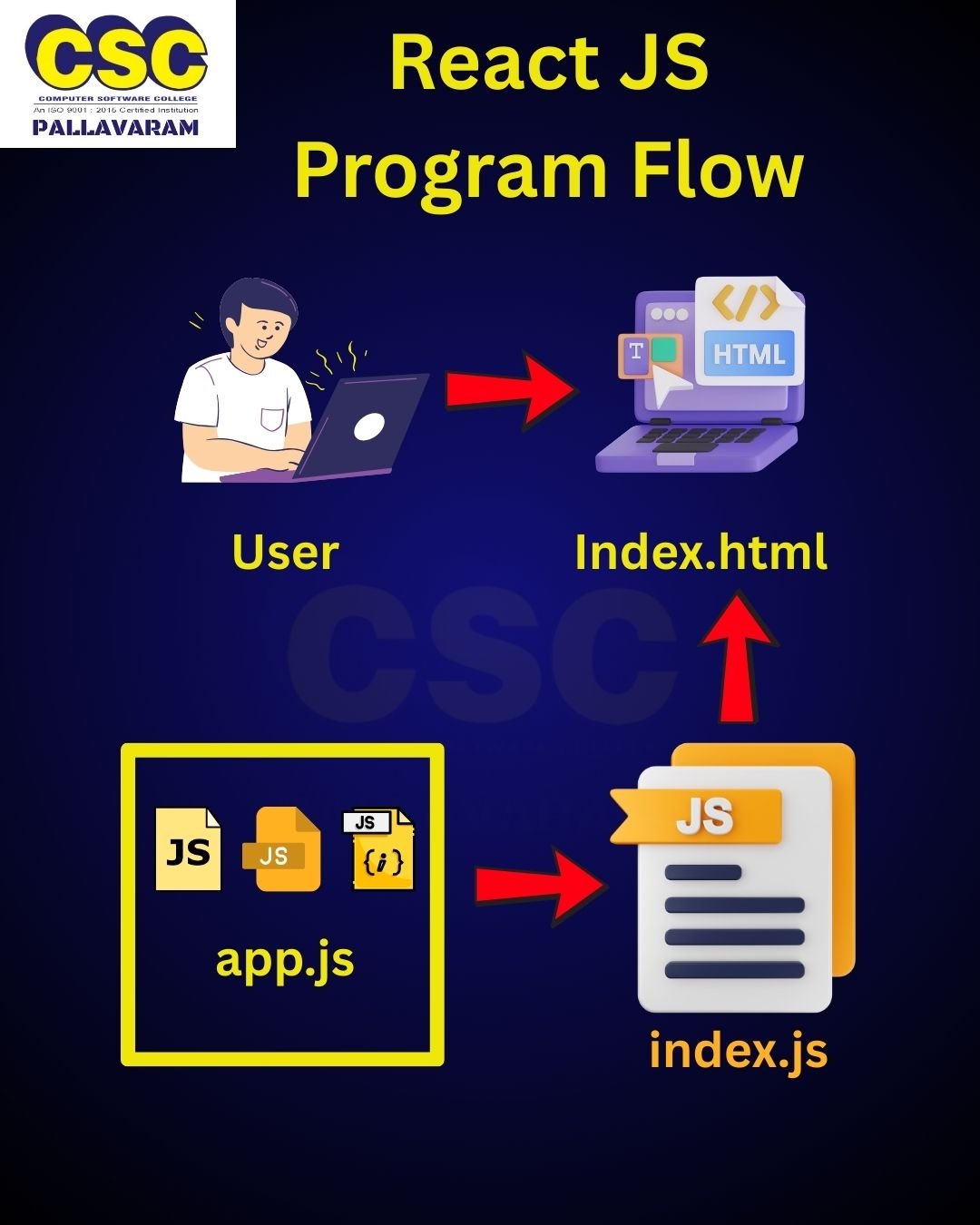
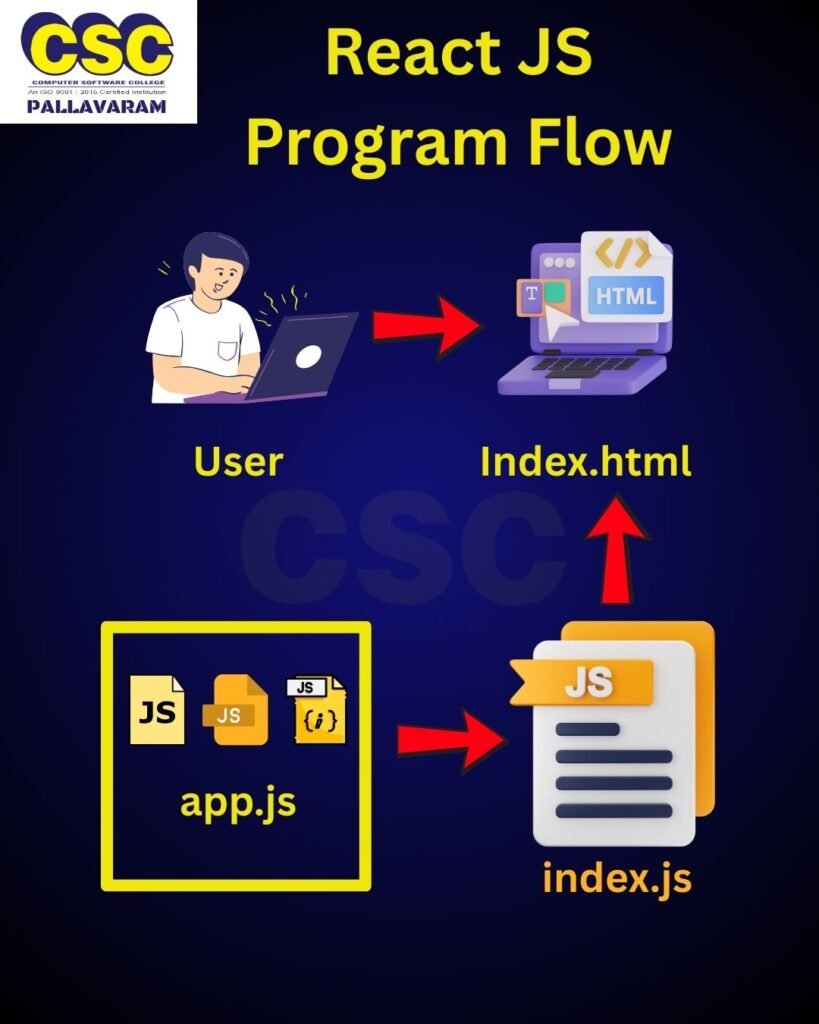
Program Flow
- index.js loads first
- Finds
<div id="root">in index.html - Renders App.js component inside root
- App.js returns JSX that becomes HTML
index.js breakdown:
import React from 'react';                    // Line 1: Import React library
import ReactDOM from 'react-dom/client';      // Line 2: Import ReactDOM for rendering
import App from './App';                      // Line 3: Import our main App component

const root = ReactDOM.createRoot(             // Line 4: Create root element
  document.getElementById('root')             // Line 5: Find 'root' div in HTML
);
root.render(<App />);                        // Line 6: Render App component
Must Know Concepts
JSX (JavaScript XML):
- Write HTML-like syntax in JavaScript
- Must return single parent element
- Use
classNameinstead ofclass - Self-closing tags need
/(like<img />)
Basic App.js:
import React from 'react';        // Line 1: Import React
import './App.css';              // Line 2: Import styles

function App() {                 // Line 3: Create App function component
  return (                       // Line 4: Return JSX
    <div className="App">        // Line 5: Main container (use className, not class)
      <h1>Hello World!</h1>      // Line 6: Heading element
      <p>My first React app</p>  // Line 7: Paragraph element
    </div>                       // Line 8: Close main container
  );                            // Line 9: Close return
}                               // Line 10: Close function

export default App;             // Line 11: Export component for use in other files
Do’s and Don’ts
DO’s:
- Use PascalCase for component names (
MyComponent) - Use camelCase for variables (
firstName) - Always import React in component files
- Use
classNameinstead ofclass - Close all JSX tags properly
DON’Ts:
- Don’t modify files in
public/folder (except index.html) - Don’t use
classattribute (useclassName) - Don’t forget to export your components
- Don’t have multiple elements without a wrapper
Components
Components are the building blocks of React apps. There are two types: Functional and Class-based.
Example 1: Functional Component
UserCard.js – A card showing user information
import React from 'react';                    // Line 1: Import React

function UserCard({ name, age, email }) {     // Line 2: Functional component with props
  return (                                    // Line 3: Return JSX
    <div className="user-card">              // Line 4: Card container
      <h3>User Profile</h3>                  // Line 5: Card title
      <div className="user-info">            // Line 6: User info container
        <p><strong>Name:</strong> {name}</p>  // Line 7: Display name from props
        <p><strong>Age:</strong> {age}</p>   // Line 8: Display age from props
        <p><strong>Email:</strong> {email}</p> // Line 9: Display email from props
      </div>                                 // Line 10: Close info container
      <button>Send Message</button>          // Line 11: Action button
    </div>                                   // Line 12: Close card container
  );                                         // Line 13: Close return
}                                           // Line 14: Close function

export default UserCard;                     // Line 15: Export component
Using UserCard:
import UserCard from './UserCard';

function App() {
  return (
    <div>
      <UserCard name="John Doe" age={25} email="john@email.com" />
      <UserCard name="Jane Smith" age={30} email="jane@email.com" />
    </div>
  );
}
Example 2: Class Component
Counter.js – A counter with increment/decrement buttons
// Import React and Component class from react library
import React, { Component } from "react";

// Define a class component named 'Welcome' that extends React.Component
class Welcome extends Component {
  // Constructor to initialize the component
  constructor(props) {
    super(props); // Call the parent class constructor (mandatory when using props)

    // Initialize state (a component’s private data)
    this.state = {
      message: "Hello, Welcome to React!" // Default message
    };
  }

  // Arrow function to update state when button is clicked
  changeMessage = () => {
    // setState() is used to update state values and re-render UI
    this.setState({ message: "You clicked the button!" });
  };

  // Every class component must have a render() method
  render() {
    return (
      <div>
        {/* Display the current message from state */}
        <h1>{this.state.message}</h1>

        {/* A button that triggers changeMessage() when clicked */}
        <button onClick={this.changeMessage}>Click Me</button>
      </div>
    );
  }
}

// Export the component so it can be used in other files
export default Welcome;
Key Differences
Functional Components:
- Simpler syntax
- Use hooks for state and lifecycle
- Preferred in modern React
- Less boilerplate code
Class Components:
- More verbose syntax
- Built-in state and lifecycle methods
- Traditional approach
- Still valid but less common
Component Best Practices
File Naming:
- Use PascalCase:
UserCard.js,Counter.js - One component per file
- File name should match component name
Component Structure:
- Import dependencies first
- Define component
- Export at the bottom
- Keep components small and focused
This covers the fundamentals of React app creation, templates, and components. Each concept builds on the previous one, creating a solid foundation for React development.